

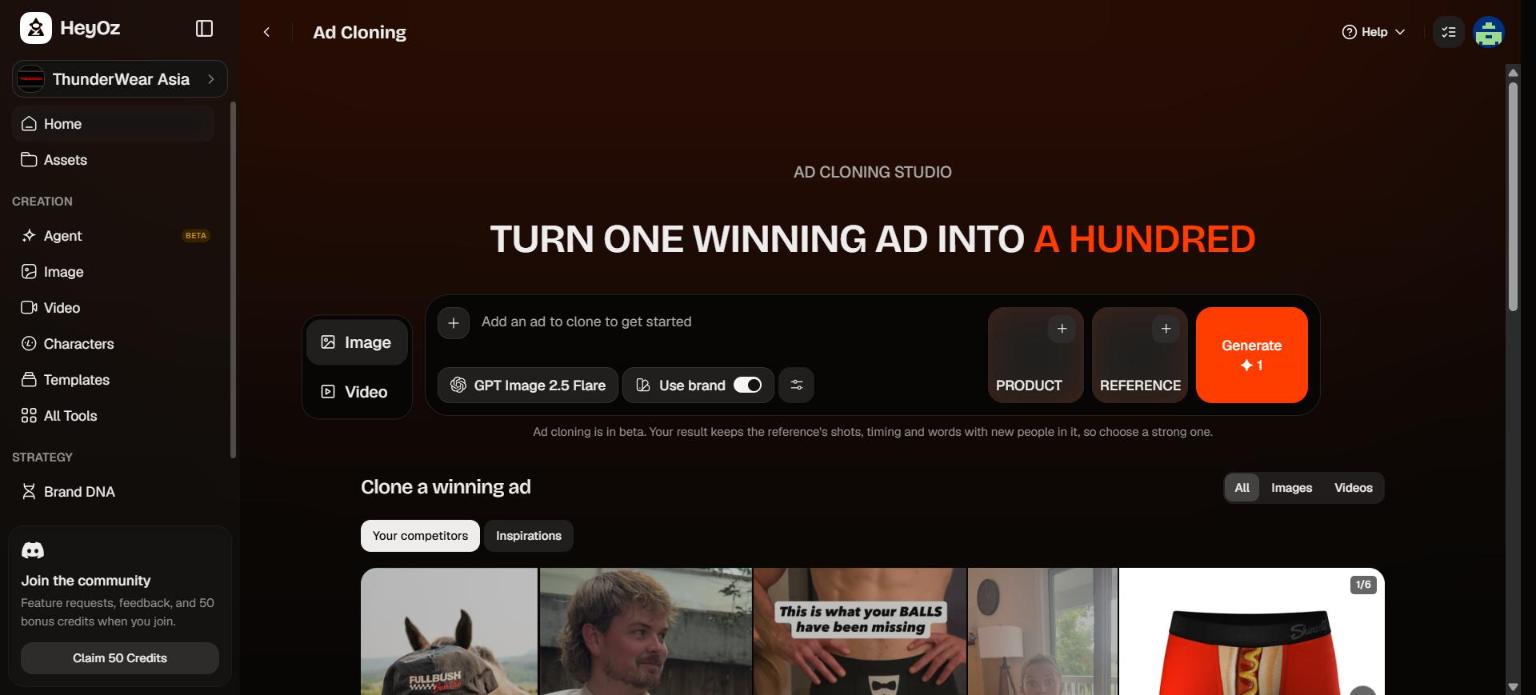
Clone an ad
1
Open Ad Cloning
On the Home page, click the Video tab and click Clone an Ad. You can also click Clone an Ad under the prompt box.
2
Pick image or video
Click Image or Video on the left of the prompt box, based on the type of ad you want to clone.
3
Add the ad to clone
Click the Reference box and upload the ad you want to copy. You can also scroll down to Clone a winning ad and pick one.
- Your competitors: ads from brands you track.
- Inspirations: more ads to get ideas from.
4
Add your product
Click the Product box and pick or upload your product.
5
Check the model and brand
For image ads, the model is set to GPT Image 2.5 Flare. Click it to choose another. Turn on Use brand to add your brand style.
6
Click Generate
The button shows the credit cost.
Tips
- Ad Cloning is in beta. Your result keeps the original ad’s shots, timing, and words, with new people in it. Pick a strong ad to start.
- Clone ads that have run for a long time. Brands rarely keep paying for ads that fail.