

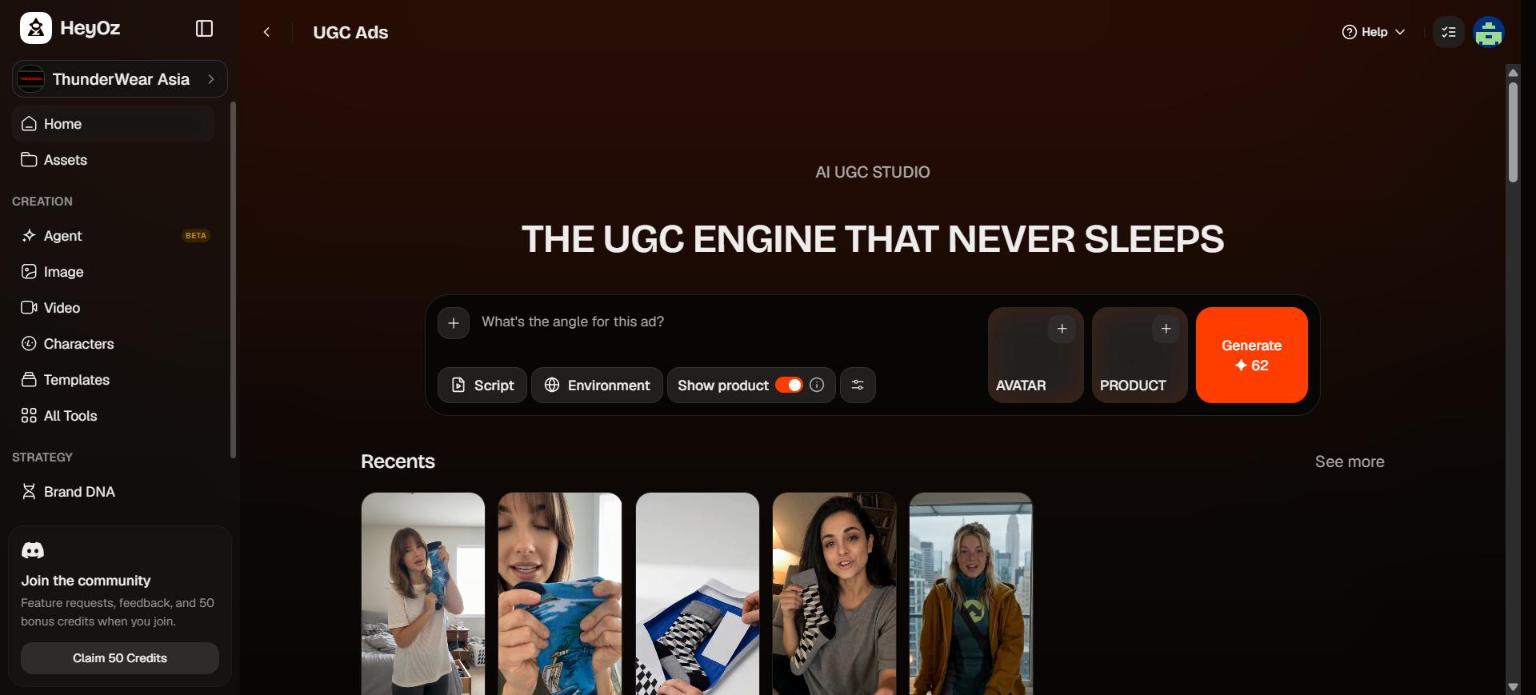
Make a UGC ad
1
Open UGC Ads
On the Home page, click the Video tab and click UGC Video. You can also click Make a UGC video under the prompt box.
2
Start from a template (optional)
Scroll down to Templates for you. Click a category, such as Beauty & Skincare or Electronics, then click a template to use its format.
3
Pick an actor
Click the Avatar box. Choose an AI actor or one of your own characters.
4
Add your product
Click the Product box and pick or upload your product.
5
Write your ad angle
Type into the What’s the angle for this ad? box. Say what the actor should talk about.Good example: “A busy mom says these socks are the only ones that survive her kids.”
6
Add a script (optional)
Click Script to write the exact words the actor says.
7
Pick the setting
Click Environment to choose where the actor films.
8
Show or hide the product
When the Show product switch is on, your product appears in the video. Turn it off if you only want the actor talking.
9
Click Generate
The button shows the credit cost. Your video appears under Recents.
Tips
- Hook the viewer in the first 3 seconds. Start with a problem or a bold claim.
- Write the script the way people talk. Short sentences sound more real.
- Make the same ad with two different actors and test which one sells more.