

Find the video tools
1
Open the video tools
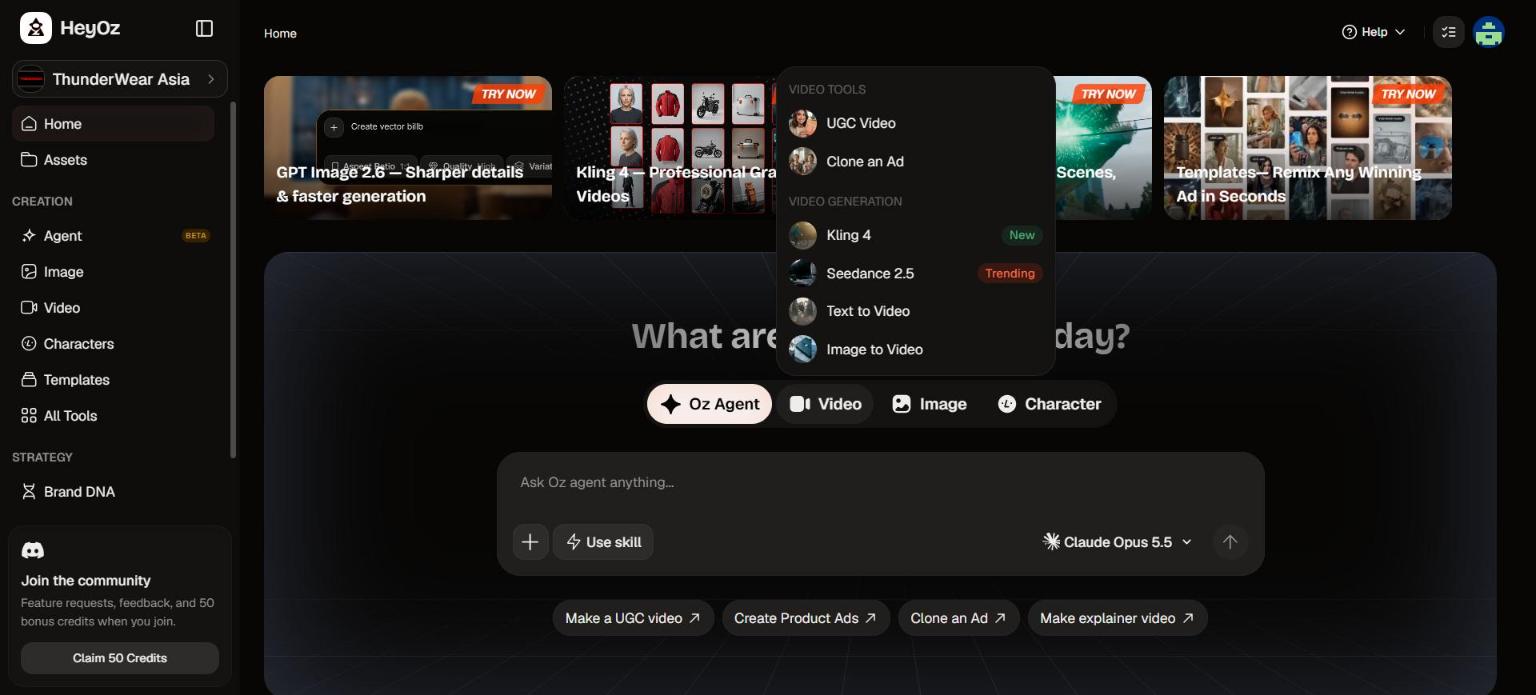
On the Home page, click the Video tab. A menu opens with two groups.
- Video Tools: UGC Video and Clone an Ad.
-
Video Generation: Kling 4, Seedance 2.5, Text to Video, and Image to Video.
2
Pick a format
- Video Generator: make a video from a prompt, images, or videos.
- Motion Control: copy the moves from one video onto your character.
- UGC Ads: creator style videos with AI actors who talk about your product.
- Ad Cloning: your own version of a winning ad.
- Video Templates: proven video ad formats you remix with your product.
Video models
Pick a model in the Video Generator. Each line shows the resolution, the length, and if the model makes sound.- Seedance 2.5: tagged Best Quality. 480p to 1080p. 4 to 30 seconds. Audio.
- Kling 4: tagged New. 720p to 1080p. 3 to 30 seconds. Multi shot video with native audio.
- Seedance 2.0: 480p to 4K. 4 to 15 seconds. Audio.
- Google Omni Flash 1.1: tagged New. 720p to 4K. 5 to 10 seconds.
- MiniMax H3: 768p to 2K. 5 to 15 seconds.
- MiniMax H3 Max: tagged Balanced. 768p. 5 to 15 seconds.
- Wan 3.0: 720p to 1080p. 5 to 30 seconds. Audio.
- Kling 3.0 Motion Control: used only in the Motion Control tab. [VERIFY: quality range beyond 720p]
Tips
- Pick a model marked Audio, or Kling 4, to get sound in your video.
- Longer and sharper videos cost more credits. The Generate button shows the cost first.